Connect Katto to Claude in 60 Seconds (Official MCP Server)
Connect Katto's official MCP server to Claude with one URL, then clip a YouTube video by asking. No API key on disk, OAuth handles the rest.
September 5, 2026
Katto is an AI video clipper, and it ships an official MCP server. That means you don't have to open the app to use it: connect it to Claude once, then ask in plain English — "clip the best moments of this YouTube video" — and Katto downloads, transcribes, scores and renders vertical captioned clips, then hands them back ranked by a virality score.
No install, no API key pasted into a config file. Here is the whole thing, start to finish.
Connect in 60 seconds
- In Claude, open Settings → Connectors and choose Add connector.
- Paste the hosted endpoint:
https://mcp.katto.tech/mcp - Click Allow to sign in with your Katto account (OAuth). That's it — no key to copy, nothing stored on disk.
Prefer a local setup, or using Cursor, VS Code, Windsurf or ChatGPT? The per-client guides cover each one, including the npx command and the API-key header if you'd rather not use OAuth.
Then just ask
Once it's connected, you talk to Katto in normal language. A first prompt to try:
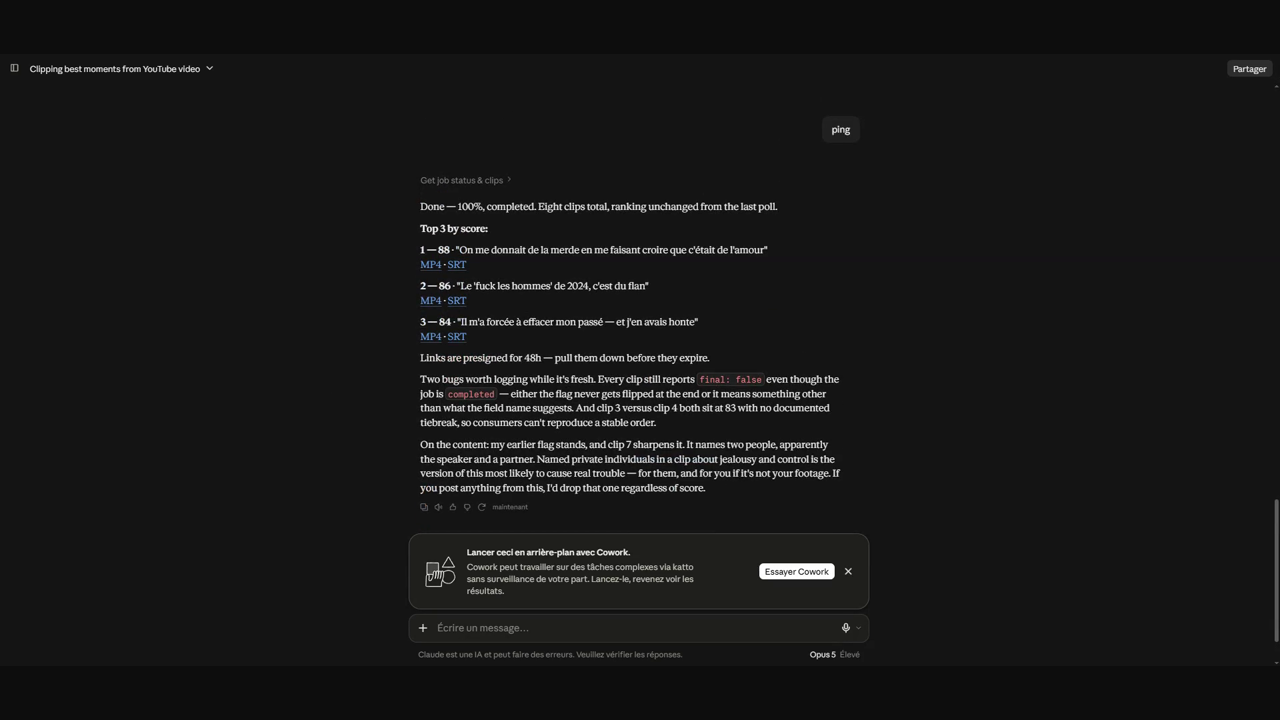
Clip the best 3 moments of https://www.youtube.com/watch?v=YOUR_VIDEOClaude calls Katto, you get back a job id, and you can poll it until the clips are ready:
What's the status of that job? Show me the clips with their scores.Each clip comes with its MP4 url, an SRT caption file, a title, and a 0–100 virality score, ranked highest first. When a clip's field hd turns true, its 1080p render is final; the job-level hd_ready flag tells an agent when every clip is done, so it never caches a link that's about to change.
What you can do (29 tools)
The connector is not a single "make clips" button — it exposes the whole pipeline as tools an agent can compose:
- Create & control jobs — submit a video URL, list your jobs, cancel a running job (and get the video credit refunded instantly).
- Read the output — job status and progress, the finished clips, the timestamped transcript.
- Re-render, free — re-render a clip with a different reframe layout or caption style, or dub it into any of 19 languages, without spending quota.
- Discover & configure — list the supported sources, the clip-length buckets, and the caption-style presets, plus your plan, quota and saved brand kit.
- Edit & publish — change a clip's length, title or hook, translate its captions, rate it, then publish it or schedule it to your connected accounts.
It works from your own code, too
The MCP server is a thin layer over Katto's public REST API — same endpoints, same responses. So whether you drive it from Claude, from Cursor, or from a script with a sk_live_ key, you get the same jobs, the same scored clips, idempotent retries and signed webhooks.
Try it
Connect Katto to Claude at https://mcp.katto.tech/mcp, read the MCP overview and the API docs, or start with a free account. If you kick the tires and something surprises you, tell us — we read every reply.
Related articles
Ready to turn your videos into viral clips?
Katto automatically clips, captions, and reframes your long-form videos into short-form content.
Try Katto for free →